Hello, this is Sergio Ordóñez from SOSFactory and this time I'm going to talk about my workflow used to design mascots for websites. This process in this article was described in real time as I created the designs. Let's look at this more closely.
This article was originally published on Psdtuts in September of 2008.
Introduction
This time I wrote this post as the job was being developed. This way you’re going to see how the order is developed, from the first sketches to the final result, I hope I won’t miss anything… What stress!
Also, notice this is not a Photoshop tutorial where I explain everything in depth (for that I already wrote a really detailed tutorial about mascot design in Photoshop). My goal here is to show the way I work. Below is the final design I did for Mafia Death.

About the Client
I want to keep your attention, so to give it a mysterious touch, I'll just drop some info:
- Client: Mafia Death, an online game based on mafia stories.
- Order: Design of five characters and design of logotype. The characters must work separately and jointly.
Descriptions:
- The Boss: The family’s chief, he only has to raise his eyebrow and you are a dead man. He is not very talkative, not specially strong physically… His better weapon is his brain.
- The Bodyguard: He is the brawny of the team, the one who fixes the loose ends. His favorite sound? The crack of a breaking neck. If you notice him parking in front of your house, you have less than 10 minutes to make your last will.
- The Latin-Lover: He is in charge to negotiate the important deals. A smart guy, attractive, athletic, with a fine taste for clothing and women, latin appearance and charm. He has a weakness for blondes and is quite independent. If you go out at night with him, tell your parents you won’t arrive home before noon.
- The Girl: Only her sensuality matches her wickedness, she is cold and calculating. She is a precision weapon. She succeeds both between men and women. The last one who mentioned her affinity with Angelina Jolie is dead.
- The little mad guy: His slogan is: "Surviving is irrelevant, what really matters is how many ones you can annihilate". His mind is so insane that he is only useful in desperate missions. Joe Pesci fan. One more important thing: Don’t ask about his scar.
Summary
- Sketching the First Three Characters
- Sketches of the Rest of the Team
- Scene Composition
- Cleaning the Sketches
- Inking the Characters
- Coloring The Boss
- Coloring The Latin-Lover and The girl
- Coloring The Little Mad Guy and The Bodyguard
- Final Illustration
- Closing Words
Day 1: Sketching the First Three Characters
I love Mafia films, so I didn’t need to look for any references and we directly went for the sketches. Mi idea was to find a mid point between the elegance of “The Godfather” and the modernity and daily look of “The Sopranos”.
I asked my friend Miguel Ruiz to help me with the sketches, I sent him descriptions for each character and the image below is what he sent me back.


The first thing that hits you in the eye is the style, it is not the usual SOSFactory style. But don’t worry, because in the end everything will match. What really matters now is the character´s attitude, their pose, facial expression, the clothing… that each character transmits what it must transmit (have a look to the descriptions at the beginning of this post):
- The Boss: I think this one is great, it is exactly what we need. He has a relaxed pose but transmits a lot of strength by his look. His legs look a bit short to me and his waist is a bit wide, but it is an excellent starting point.
- The Bodyguard: I think this character is quite good too. I’d like to put all the characters on a horizontal line so I’ll have to modify a bit his right leg, which is a bit short. The hands pose doesn’t satisfy me, and I have to work a bit on the left arm musculature too. The face looks perfect to me.
- The Latin-Lover: This character is going to need quite a lot of work. I like the pose but it’s too lateral, there is very little space left for the chest, so it won’t look good. We don’t have place for the gun either, so we’ll put him in a ¾ pose, a little more frontal. I don’t like the feet pose at all, we’ll put them in a 90 degrees angle. The face has to be retouched too, I need him to be more attractive.
Summary of the day: I like the sketches, they have to be improved technically, but they transmit the proper attitudes, specially the first two ones. The third one has to be almost completely redone.
See you tomorrow!!!!!!!
Day 2: Sketches of the Rest of the Team


- The Girl: From this character I like the facial expression, but she looks too classical. I’d rather something more modern and sensual, I think we’ll have to make many changes.
- “The little Mad Guy”: I like his attitude, but technically it’s quite improvable. The hand of the gun is too short; the hand that holds the cigar is too close to the body, we’ll separate it to make the pose clearer; the waist is too wide, it has to be slimmed a bit. He looks too young, I need an older character.
Summary of the day: We already have 5 character´s sketched, the first 2 ones are good, for the rest I’ll make many changes. If I had time I would have made the sketches myself, but because of the circumstances (I’m really busy) the investment was worth the effort.
Tomorrow I’ll make the scene composition. Regards!!
Day 3: Scene Composition


We already have all the team members, now we have to line them up looking for a good composition. I think the central character should be the Boss, the Bodyguard on his right (his right hand man), on his left the negotiator (completing the trio of important characters), by his side will be the girl (we add a bit of sexual tension) and the shortish guy on the opposite side to balance the composition.


Summary of the day: We already have the scene composition, together they look very promising, much better than I expected. From now on I will retouch each character.
Let’s have fun!
Day 4: Cleaning the Sketches
In this step, I try to fix the stuff I commented on from Day 2, I use my Wacom Cintiq and Photoshop, from this point everything I do is digital. I use old sketches, references from other designs or photos, I draw once and again until everything is well defined. Under each drawing you can find the corrections we talked about in Day 2.


The Boss: I made his legs longer, I reduced the waist a bit, I added some details to his suit, I defined the volumes a bit and I retouched the face.


The Bodyguard: I mainly worked on the torso. Notice that I lowered his arms to make his face clearer. I retouched his left arm and I corrected a bit the tallness of his legs.


The Latin-Lover: This character is almost completely redone. I made a little more frontal pose and I lowered his arms to gain some space in the chest area. I drew his legs in a smarter pose, and I gave him a more attractive face.


The Girl: From this character I only kept the facial expression. Luckily I had a sketch I hadn’t used before, and it fit quite well. Now she’s much more sensual and has a more modern look. I used Angelina Jolie as a reference.


The Little Mad Guy: I also changed this character almost completely. The arm that holds the gun was too short so I separated it a bit from the body. I separated the gun with the cigar too, this way the silhouette is much clearer. I stylized the pose with a narrower waist and separating his legs (a much more active pose), I added a clearer scar and a more pronounced chin.
Summary of the day: The first two characters were easy to correct, from the third I re-drew them... Everything is going as I expected.
Let’s continue tomorrow :)
Day 5: Inking the Characters
We already have all the characters ready, now it’s time clean the lineart. I entrusted this to my buddy Carlos Gomez, he’s very clean at drawing. He draws everything with pencil and then I ink his lines and I retouch them until everything is perfect, you can see the progress below.


Click the image below to see a bigger "step by step" image.
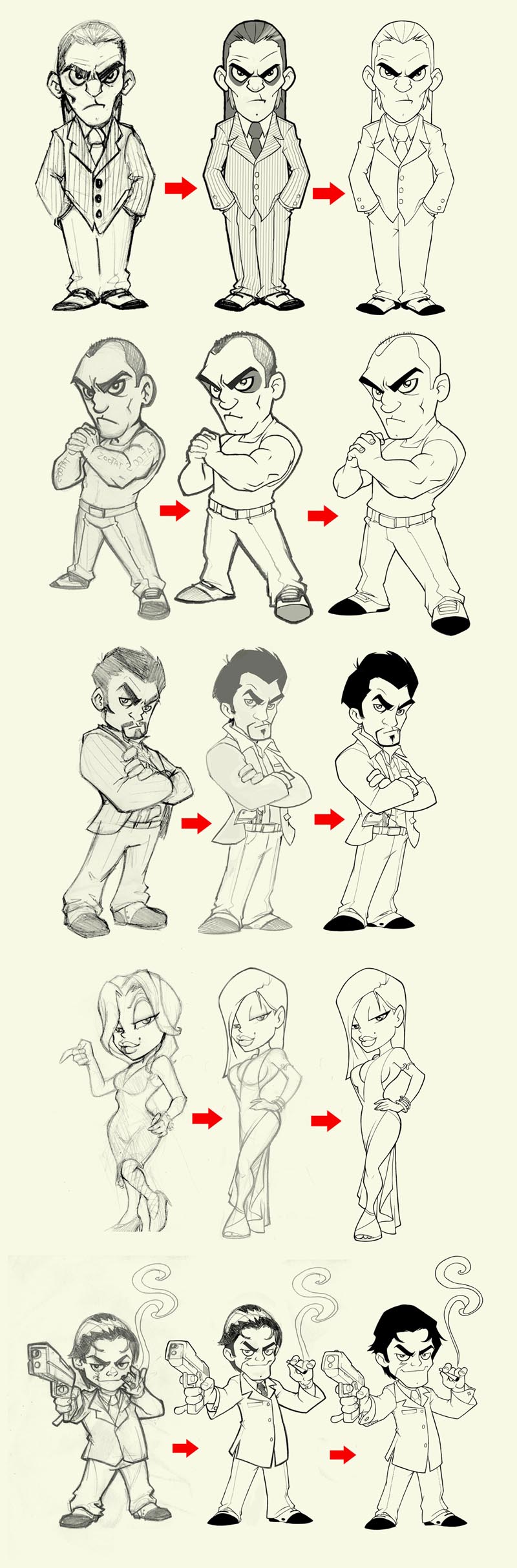
I already explained a lot of things about digital drawing in other tutorials, so I wont repeat it again. As you can see in this video there is no secret tips, just practice.
Summary of the day: After a week of vacation in Berlin, I’m back to work. The drawings are ready for the coloring, this is gonna be really fun.
Regards!!!
Day 6: Coloring The Boss
As you surely know, the color is my speciality, it's what I like best and the part I spend more time at. I usually color with a cartoon style, with very bright colors, but in this case I think that more moderated colors will fit better, funny but mysterious, with very contrasted dark tones.
I made a first version with cold colors, it looks OK, but I think that with warmer colors, and more “worn out” tones, it matches better with the theme. Don’t think I colored it all again from the beginning, I used the Photoshop correction tool (Command + B) and I added a bit of Cyan and Green. Easy, isn’t it?


I already did a tutorial about digital color, so I wont repeat everything again, instead you can see how I work in this video tutorial below.
Summary of the day: after many hours of testing, the color looks great, the challenge is now to compound the scene to make the 5 characters work as a whole.
Tomorrow, more!!
Day 7: Coloring the Latin-Lover and the Girl
Now that I have defined the color palette I can work faster. The characters still look good to me separately, but too laden when I put them together. That’s because I decided to soften a bit the colors, here goes the second character - ready!

And here we have the girl. She looks great but we have a problem. The most eye-catching color range is the one on the right, but the more coherent with the rest of the characters is the one on the left. My choice would be to sacrifice the character for the sake of the illustration, but the client doesn’t agree... We’ll see what happens.


Summary of the day: We have already finished the most difficult part, to choose the color ranges, so I’m going quite fast and I’m feeling comfortable. I expect that as I continue working the color will be improved.
Let’s continue tomorrow!!!
Day 8: Coloring the Little Mad Guy and the Bodyguard
Alright mates, I finally finished all the characters :)


I’m specially proud of the last two ones, they are exactly as I imagined them at first. Unfortunately, I only achieved this from the third character (although the first ones are not bad at all). Notice that these characters look good separately, but because of the softer color and a less contrasted source of light, they are more harmonic and will look better when we compose the scene.

The worst part of this character was the musculature... Ufff!!! But it’s finally looking good. I also corrected the position of the hands.
Summary of the day: The last two characters were beautiful, quick and fun to make, I finally got it. After five characters with this color style, I think I can handle it, this will be very useful for me in the future.
Day 9: Final Illustration
At last, the great day, after many hours of work I can say the illustration is finished. I made some color corrections to unify each character. Click the image below to enlarge.
Summary of the day: As I expected, I had to make some adjustments to join the characters. I’m quite happy with the result and the client too. So another good piece for the SOSFactory portfolio.
Closing Words
Well mates, I hope it was useful and fun to read, I did my best. If you like this stuff I'm sure Psdtuts+ will invest more to have me writing for you again, so push the comments hard. Of course, if you have any questions I will answer with pleasure!
Thanks to David from Mafia Death for giving me permission to share this info, please give him some love and sign up to play his game.
Sergio Ordóñez on the Web: SOSFactory is my portfolio, SOSNewbie is my blog, sergitosuanez is my username on Deviantart, and 00SOSNewbie00 is my username on YouTube.